The governed AI agent that lets your team use AI safely

The kelv agent gathers information scattered across your tools and gets work done within your company's rules. Use it from Slack, Teams, or its own workspace.

Supported AI models
ClaudeOpenAIGeminiDeepSeekQwenLlama ClaudeOpenAIGeminiDeepSeekQwenLlama
kelv agent

An AI agent
you can ask in chat

Mention it in Slack or Teams to hand off work like organizing documents or creating tasks. It checks your company's rules before acting, and every action goes into the audit log.

Slack / AsterScreen mockup
# sales
S
Sato10:02

@kelvCan you pull the key points from last month's call notes for next week's proposal?

kelv is checking sources
kelvAIDone10:03

I reviewed 4 call notes and the proposal template, narrowed things down to 3 key points, and wrote a memo.

  • Checked sources4 September call notes, proposal template v1.2
  • Wrote the key points memoBudget, timing, and approval process
  • Waiting for owner reviewExternal sharing happens after review
Key points memo (next week's proposal)v0.1 / draft / saved to workspace
Open doc
Make a taskRequest changes
What the control layer doeskelvControl layer
  1. 01Receives the requestFrom the kelv agent in the work layer
  2. 02Gathers information4 call notes, proposal template
  3. 03Checks the rulesSales docs only; external sharing needs approval
  4. 04Runs on a modelClaude, chosen for the task
  5. 05Logs the runRequester, sources, and result go to the audit log

Screens, conversations, and company names are fictional design examples.

How it works

Gather scattered information,
then run AI models within your rules

The kelv agent gathers scattered information

The information work depends on is spread across tools: conversations in Slack and Teams, documents in Drive and Notion, customer data in Salesforce. As the entry point in the work layer, the kelv agent takes requests, gathers what's needed, and passes it to the control layer.

Company rules and the requester's permissions are checked

Gathered information comes together in one place: the control layer. Each request is checked against company and team rules set in advance. The kelv agent can act only within the requester's own access and action permissions. It won't read files that person can't see, or take actions that person can't take. Every run passes through here and is logged in the same format.

Only checked work runs on AI models

Only work that has cleared the control layer runs on AI models. Use Claude, OpenAI, Gemini, or your in-house LLM, depending on the task. We can also help you build a local LLM on your own infrastructure.

Model layer
Claude
OpenAI
Gemini
Llama
Qwen
In-house LLM
Control layer
Gathered information
Control rules
Requester permissions
Logging
kelv
Work layer
SlackTeamsDriveNotionSalesforceGmailExcel
kelv agent
Scattered informationkelv agentRules applied · logged
Use cases

Use cases by department

Write requests the way you'd write any chat message. The kelv agent works within each department's rules and permissions.

01Sales
@kelvPull the key points from past proposals and minutes for next week's client meeting

The key points memo is ready. I'll send it to the client after approval.

Awaiting approval

02Corporate planning
@kelvEvery Monday at 9:00, compile each department's numbers and share them

Added as an automation. Results will arrive in your inbox.

Scheduled
03Finance and admin
@kelvFind this month's expense claims that don't follow policy

Found 3 and drafted follow-up requests to the submitters.

Done
04Engineering
@kelvWrite up yesterday's outage and create tasks to prevent a repeat

Drafted the incident report and created 4 tasks.

Done
05Customer support
@kelvDraft FAQ answers from our support history

Drafted 12 answers and requested review before publishing.

In review
06HR
@kelvOrganize evaluation criteria from the interview notes and share them with the next interviewer

Created an evaluation sheet and shared it with the hiring team only.

Done

Requests and results are illustrative examples.

Connects to the tools you already use

Some integrations are planned. We'll confirm availability when you talk to us.

SlackTeamsGoogle DriveGmailGoogle CalendarGoogle SheetsNotionBoxSharePointOutlookExcelWordPowerPointSalesforceHubSpotGitHubJiraZoom
Delegate safely

Works on its own,
within the rules you set

The kelv agent handles assigned work on its own. Irreversible actions, such as sending outside the company or deleting data, don't run without approval.

# salesScreen mockup
T
Tanaka14:10

@kelvSend the proposal to Takahashi at the client

kelvAIAwaiting approval14:10

Sending outside the company needs approval. I've asked the Head of Sales to approve it.

Review before sending
Action
Email / external
To
Takahashi (fictional)
File
Proposal v0.4
Request changesApprove and send

Nothing is sent until approved.

Y
Yamamoto14:26

@kelvDelete all the old customer data

kelvAINot run14:26

Deleting customer data is blocked by the execution policy. Should I list the records and ask an admin to review them?

Make the listCancel
  1. 01

    Access limited to what's allowed

    Information policies set which documents and storage locations each department or job can access.

  2. 02

    Approval for irreversible actions

    Actions you specify, such as external sends or deletions, wait until the owner approves.

  3. 03

    Every action logged

    kelv records who asked, which model ran, and what was done. Auditors can trace the full history.

  4. See how rules and logs work →
kelv workspace

Everything you ask for,
in one workspace

kelv has its own workspace for working with the agent. Work requested in Slack or Teams lands here too, as docs, tasks, and automations.

People and AI work in the same conversation

The kelv agent works with your team, building on earlier conversations.

01Keep information in one place

Chat, docs, tasks, and automations live in the same project. The kelv agent draws on all of them.

02Work with AI from the same information

AI works alongside your team within its permissions, taking the owner's decisions and past history into account.

03Create tasks straight from the conversation

Reply “Create 1, 2, and 3” and they go on the board as tasks with owners.
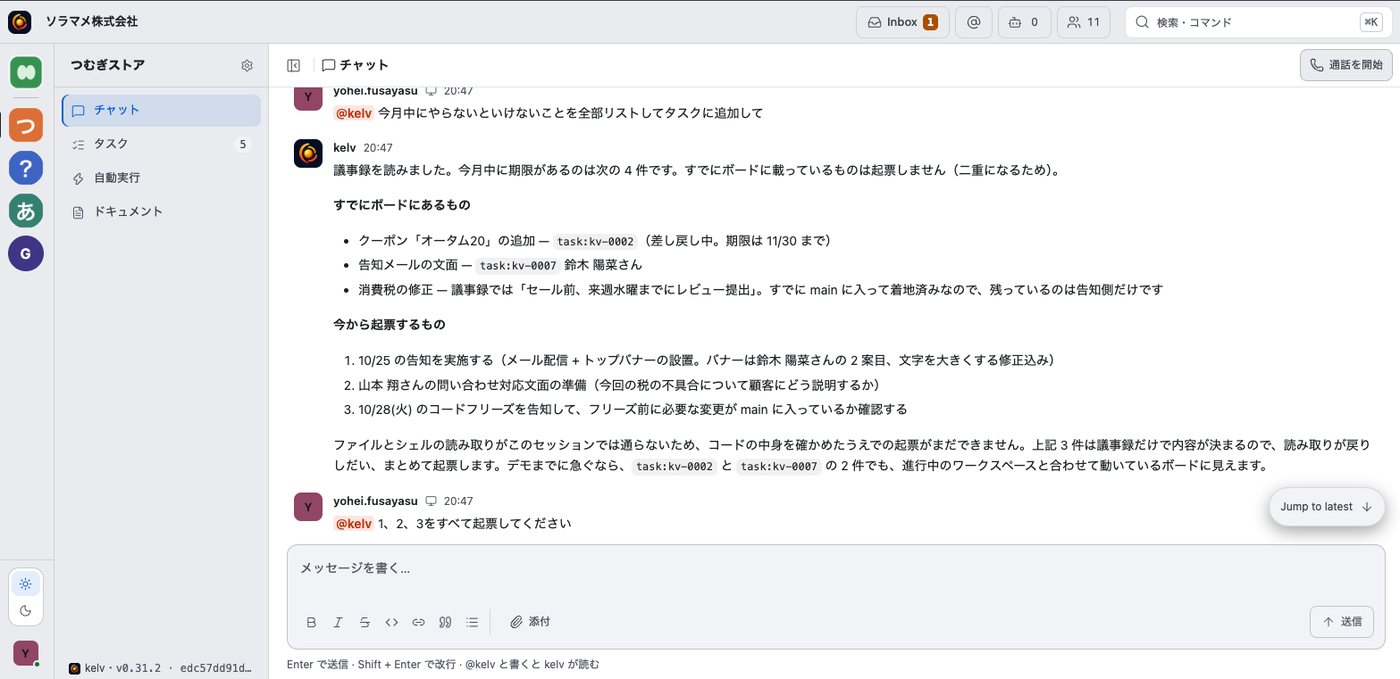
kelv / Chat
kelv chat screen, pulling tasks from meeting minutes and creating them
Screens are from a demo environment

Meetings become docs with decisions and owners

kelv turns calls and conversations into a doc of decisions, action items, and open questions. People just review and correct it.

01Decisions

Lists what was decided, including conditions and deadlines.

02Owners and deadlines

A table of who does what by when. Anything undecided is marked “TBD.”

03Open questions

Inaudible or unclear parts are flagged, not guessed.

04Versions and editing

Revision history is kept. Switch between view, editor, and Markdown to make changes.
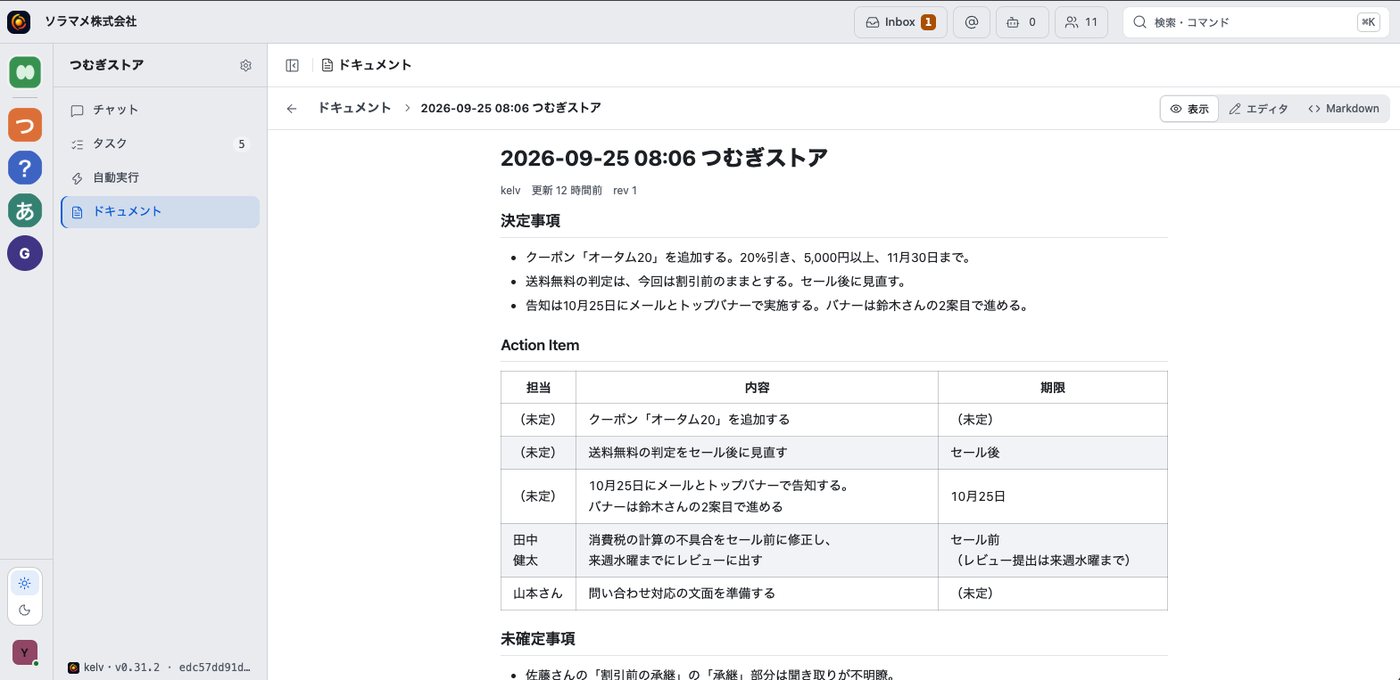
kelv / Docs
kelv docs screen, a document of decisions and owners
Screens are from a demo environment

AI runs routine work automatically

Ask in chat, for example “Review stalled tasks every Monday at 9:00,” and it becomes an automation. Results go to the owner's inbox.

01Set up in chat

Say when, what, and how, and it's added to the list. No detailed setup screens.

02Schedules and event triggers

Run on a set day and time, or when something happens, such as a monitoring alert.

03Results to your inbox

Each run sends results to the owner's inbox, where they stay until marked done.

04Requester and history recorded

Logs who set it up and when, and when it last ran.
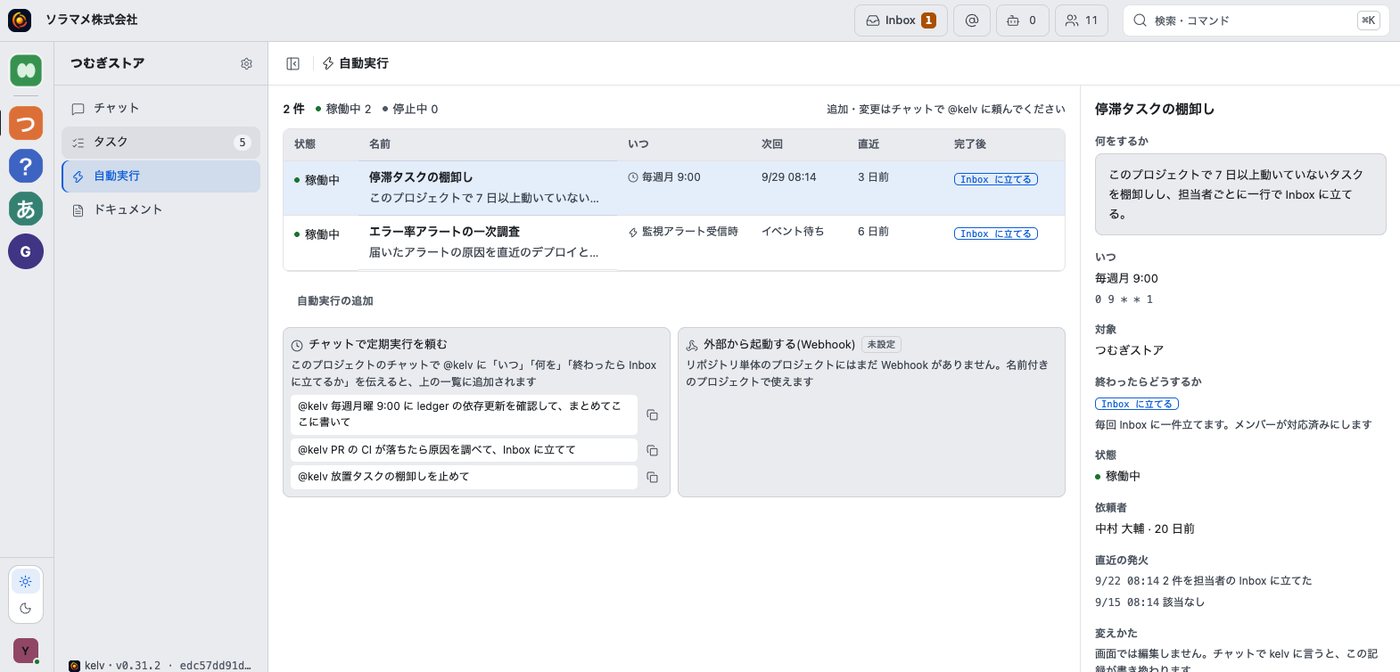
kelv / Automations
kelv automations screen, a list of schedules and event triggers
Screens are from a demo environment

Manage tasks from conversations on a board

Tasks created from chat or meeting minutes appear on the board with parent tasks, owners, and status. People and AI track progress on the same board, from spec to done.

01Created from conversations

Decisions in chat or minutes become tasks with owners automatically.

02Status definitions

People and AI share the same meaning for each status, such as spec, ready, in progress, and in review.

03Group under parent tasks

Group tasks under a parent and see overall progress.

04List and board

Switch between list and board, and track by owner or ID. AI can be an owner too.
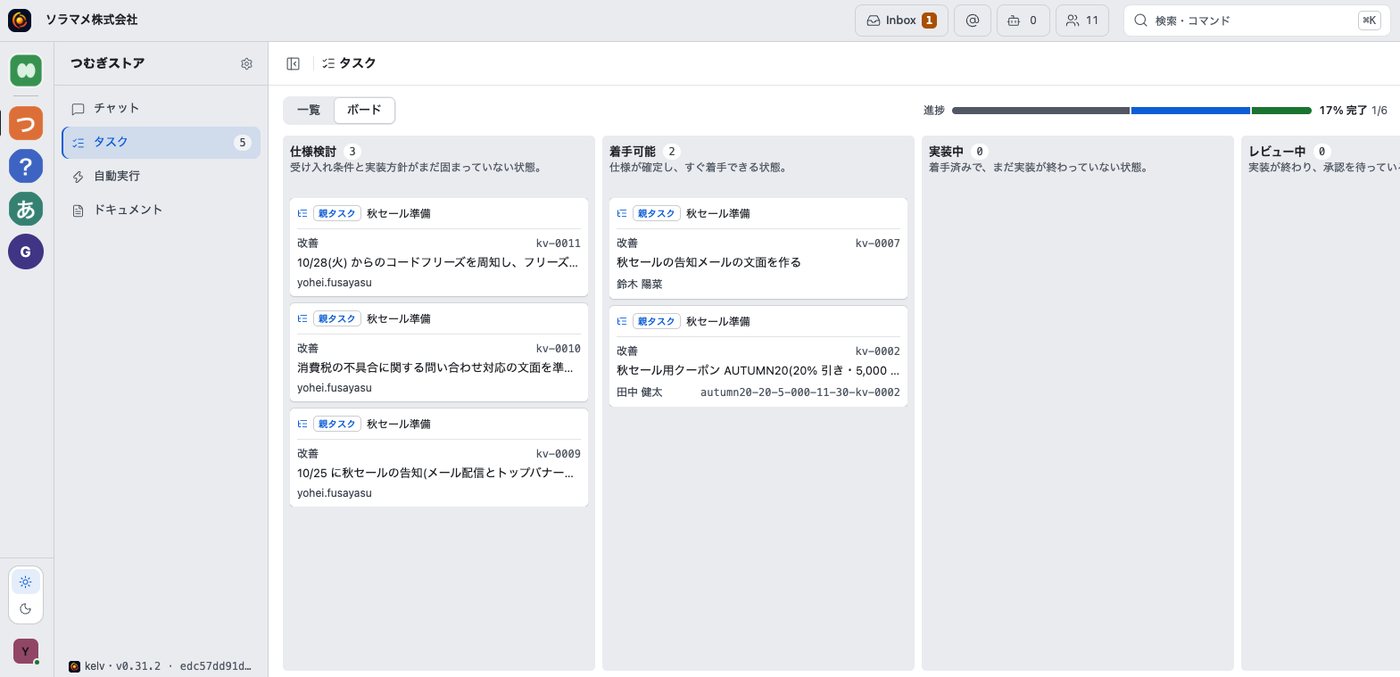
kelv / Tasks
kelv task board screen
Screens are from a demo environment

The same features in Slack and Teams

Featurekelv workspaceSlack and Teams
Requests and chatAsk in the project chatMention @kelv in a channel or DM
DocsCreate, edit, and versionAsk in chat to create or edit; open from a card
TasksCreate and manage on the boardCreate right from the conversation
AutomationsAdd and pause from the listAsk for “every Monday” to set one up
ApprovalsApprove in the inboxApprove from the notification card
Audit logReview in a listOpen from the reply link

We'll confirm scope and timing when you talk to us.

THE HUMAN SIDE OF AIA HUMAN KIND OF PROGRESSBUILT FOR CLEAR INTENTSPACE FOR WHAT COMES NEXTHUMAN VALUE. MADE VISIBLE.CLEAR INTENT. QUIET PRECISION.

Human intent,
undiluted.
From personal know-how
to company strength.
From intent
to reliable execution.
Space for
what comes next.
Human value,
made visible.
From intent
straight to action.

People decide what AI is trusted to do.
The kelv agent works within that decision.

The problem with AI at work

AI agents are spreading across work,
but how they're used is left to individuals

More work goes to AI every day: documents, code, customer support. Yet the company hasn't decided what AI may be trusted with, and no one can see who uses it or how. Managers and approvers keep receiving work without knowing how much AI was involved.

AI use today
AI acts without approval
Work information split across tools
Sharing rules differ by person
Only the bill is visible
Each department uses AI its own way
Know-how stays with individuals
Scroll the diagram sideways
StaffApproverRequest to AIDeliverableInside the companyShared rules and logs (none)
  1. 1The kelv agent follows company rules and approvals, and keeps logs in one format
  2. 2Work information scattered across tools comes together in kelv
  3. 3Deliverables reach approvers through kelv, so AI's involvement is clear
  4. 4See tokens, cost, and results by model
  5. 5Individual know-how is shared and reused in the next piece of work
Rules

Your company's work rules apply to the agent too

Rules you set by department, team, or job apply to the kelv agent as they are. People and the agent work under the same rules.

Rules checked when the kelv agent runsIllustration
RequestA sales rep asks the kelv agent for a draft proposalWork layer to control layer
Information policyOnly Sales documents are accessible. Confidential files are excludedStorage location and external sharing conditions are checked too
QualityDrafted to the department's review criteriaRuns in the model layer
Ways of workingReporting detail and tone follow department conventionsUnclear points go to the manager
Permissions and approvalsSending outside the company needs approval, so it waits for the ownerNothing proceeds until approved
LoggingRequest, run, decisions, and result logged in one formatThe log format is the same for every model
Rules are set by department, team, or job
Logs and permissions

Every agent run logged, with requester and model

Swipe sideways

Audit trail

  • Requests, runs, decisions, and results are recorded in the same format, whatever the model.
  • Every action is tied to the user or agent that performed it.
  • Auditors and reviewers can check the history, not just the deliverable.

Permissions

  • Decide separately which work goes to AI and which needs human approval.
  • Items that need approval go to the owner's approval queue and wait until approved.
  • Each job has an owner.

Data scope

  • Decide per job which data AI may see and where it's stored.
  • Set conditions for external sharing as an information policy.
  • Choose in-house or local LLMs when your data requires it.

Shared harness

  • Individual judgment, procedures, and prompts that worked are collected.
  • What's collected becomes a shared company asset.
  • The more it's used, the more AI works your company's way.
Shared harness

Make individual know-how usable across the company

kelv collects decision criteria, procedures, and prompts that worked. They carry into the kelv agent's work across departments and models.

Individual

Individual work

Chats, docs, good prompts, edits
Ways of using AI that worked

Boundary

What's shared

The person and the rules decide what's shared
Only judgment and procedures are shared

kelv

Shared harness

Decision criteria, procedures, phrasing
Memory of your data and procedures

Run

Every run

Across departments and models,
work follows the same approach

Swipe sideways
01 — Collect

Nothing stays buried with one person

Expert judgment and the prompts and edits that worked on the job are kept instead of staying with individuals.

02 — Apply

Your way of working from day one

New team members and AI alike start working your company's way from day one.

03 — Improve

A better fit the more you use it

The more it's used, the better it fits your work, with fewer fixes and send-backs from managers.

Model switching

Works with many models

Manage every LLM the kelv agent uses under the same rules and metrics. Switch models or adopt new ones without rebuilding rules or logs.

kelvModel: Claude
Shared rulesData scope, permissions, approvalsUnchanged
Shared audit trailRequest, run, decision, resultUnchanged
UsageTokens, cost, resultsSame metrics

Shared rules

Set data scope, permissions, and approvals across models.

Shared audit trail

Keep requests, runs, decisions, and results in one format.

Usage

Track tokens, cost, and results by model.

Pick by task

Choose by performance, cost, and data requirements.

Model layer build support

We also help you build your own local LLM

Beyond the platform, we help you choose, build, and run a local LLM on your own infrastructure. With a local LLM, even work involving data that can't leave the company can use AI.

Swipe sideways
01

Model selection

  • Define accuracy, speed, and cost requirements for each job.
  • Compare open models (such as Llama and Qwen) with commercial models, and decide the mix for each use.
02

Environment setup

  • Set up inference in your data center or a dedicated cloud environment.
  • Connect it to kelv's control layer so it runs under the same rules and logging as other models.
03

Operations and improvement

  • Update or replace models based on usage and results.
  • We can also help with reinforcement learning on your business data and with task-specific models.
Data location

Choose where your data is stored

With typical SaaS, your business data is stored in the vendor's environment. With kelv, you choose where the work layer and control layer data stores live: your own cloud, on-premises, or a dedicated environment hosted by kelv. Decide based on your security needs and internal policies.

With kelv
Your environment Your cloud (VPC) External AI models (optional) SaaS vendor's environment Employees · AI agents kelvWork layer · control layer SaaS app Business dataRules · audit trail · memoryLocal LLMVendor AI model ClaudeOpenAIGemini Connected per information policyOnly when needed May be used for training Data migration may be limited
Scroll the diagram sideways

Work layer and control layer data and local LLMs run in your own cloud.

Choose where data stores live

Place work layer and control layer data stores to fit your requirements: your own cloud, on-premises, or a dedicated environment.

Or let us run it

If you'd rather not run it yourself, kelv can host it.

Local LLMs in your environment too

The model layer can be built in your own environment as well. Work with data that can't leave the company stays inside it.

Typical SaaS
kelv
Where data is stored
Vendor's environment
Your cloud, on-premises, or hosted by kelv
Data handling
Depending on the terms, it may be used to train the vendor's AI
Set handling rules to match where it's stored
Cancellation and switching
Data migration may be limited
Kept in your environment, the data stays with you
Compared with building in-house

A stack of separate tools
vs. the kelv agent

A screen that calls several AIs, or ROI analytics, can be built in-house. The hard part is keeping rules, permissions, logs, and a shared harness consistent across models. You also need a way to keep improving across the whole company.

Separate tools or in-house
With kelv
01Models
Each tool comes with its own model, so switching means rebuilding rules and operations.
Every model uses the same rules and log format, and you switch by task.
02Permissions
You rely on each tool's settings and can't draw a line between work for AI and work people approve.
Draw the line by type of work, and assign an owner for each job.
03Audit trail
Log formats differ by tool, so you can't trace decisions later.
Requests, runs, decisions, and results are logged in one format, so auditors can trace the history.
04Usage
Only the bill is visible, with nothing to compare it against results.
See tokens and cost by user or agent, alongside completed tasks and rework.
05Know-how
Prompts that worked and failures alike stay with individuals.
Expert judgment is shared as company rules. When the person in charge changes, AI carries on with the history in hand.
Getting started

Start with one team, then roll out company-wide

  1. STEP 01

    Choose where to start

    Add kelv to Slack or Teams, or start in the workspace.

  2. STEP 02

    Set the role and permissions

    In your first department, decide what it can access, what it does, and who approves.

  3. STEP 03

    Hand off the first task

    Try it with one team and widen its scope as you review the audit log.

Security and requirements

Enterprise requirements kelv is built toward

We're designing for the requirements below. Tell us what you need and in what order.

01

Permission management

Separate AI work from human-approved work, and assign owners

02

Audit trail

Log requests, runs, decisions, and results in one format across models

03

Data access scope

Set access, storage, and external sharing scope with per-job information policies

04

Model choice

Use Claude, OpenAI, Gemini, or in-house and local LLMs by task

05

Usage tracking

See tokens, cost, and results by user or agent

06

SSO and IdP integration

Connect authentication through SAML or OIDC and sync permission groups

07

Audit log export

Export logs to a SIEM or similar tools

08

Deployment options

Choose SaaS, a dedicated environment, or on-premises

09

Data location and retention

Set the storage region and rules for retention and deletion

10

Third-party certifications

Support for certifications such as SOC 2 and ISMS

FAQ

Questions we often hear
before rollout

Q01Do the workspace and Slack or Teams have the same features?

They're designed to. The display adapts to each tool, but rules, memory, and the audit log are shared. We'll confirm scope and timing when you talk to us.

Q02Can it send anything outside the company without approval?

Actions you mark as needing approval don't run until the owner approves. You choose which actions need approval, by department or job.

Q03Can we choose where data is stored?

Yes. Work layer and control layer data stores can live in your own cloud, on-premises, or a dedicated environment hosted by kelv.

Q04Which AI models can we use?

Claude, OpenAI, Gemini, DeepSeek, Qwen, and Llama. Use them alongside in-house or local LLMs, depending on the task.

Q05Does it connect to the tools we use now?

Integrations with Google Drive, Notion, Salesforce, and others are planned. We'll confirm availability when you talk to us.

Q06How does rollout work?

Pick a first department and job, and pilot with one team. Expand as you review the rules and logs.

kelv
Contact

Plan your rollout

Tell us about your work and requirements, and we'll suggest a first team and how to proceed.

Copper figure that identifies the kelv agent
kelv agent